Showing posts with label WAVE 2. Show all posts
Tuesday, April 17, 2012
Official Bada 2 Indian firmware for S8530 download and review
Hi friends, after wave 1 Samsung has finally also released the official Bada 2 update for wave 2 or gt - s8530. This is most stable and latest version of bada 2 released till now.I have done a mini review to make you aware of the changes in this firmware:
Positives:
-Smooth and Better looking UI (now it looks just like Android )
-Improved Dolphin web Browser ( does not have page too large problem )
-Camera interface is improved.Has ISO exposure settings too. ( resemles android / iphone interface )
-Better Ram management
-Maximum sms recepients are now increased to 20
- ChatOn is included just like in s8500 firmware
-Call recording is enabled for Indian firmware.
-Battery life is now superb. Easily lasts more than 3 days with light usage.
-More widgets like digital and analog clock , accurate weather info widget , calender and memo widget
Negatives:
-GPS still takes time to lock.
-Picsel Smart office is still very basic.It can't edit files.
-Video player does not have option to change colour tone.
-Messages can now only be veiwed in conversation mode.It takes time to get used to it.
The firmware is official wave 2 DD LC2 ( March 2012 release )
Download it here
You can also download this firmware through Kies.
Note: 1. for wave 1 or s8500 firmware for India download see here.
2. this post is copyrighted. Ripping it off to other sites will invoke action and charges for penalty under federal law.
Tuesday, March 6, 2012
Change language on wave 2 / s8530 and wave 3 / s8600
Hey guys , in this tutorial , you will be learning how to change language on bada 2 handsets. Bada 2 handsets include Samsung Wave 3 ( s8600 ) , s8530 (Wave 2 ) and updated s8500.
So here we start -
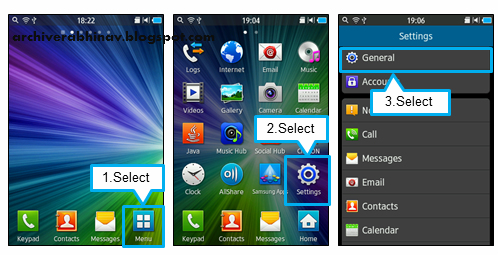
1. From the standby screen, tap Menu.
Note: you may take help of pictures , if you cant read / understand the originally set language on the phone...
So here we start -
1. From the standby screen, tap Menu.
2. Select Settings.
3. Scroll down
to General, and Select General
4. Select Language.
5. Select Display.
6. Now choose the desired language you wish to
use by tapping on it. Scroll up and down the screen to see all available
languagesNote: you may take help of pictures , if you cant read / understand the originally set language on the phone...
Thursday, February 9, 2012
Increase wave 2 s8530 battery life
Hi friends ,in this tutorial we are going to learn how to increase the battery backup of wave 2 ( s8530 ) and wave 3 .
So here is the magic code for longer battery life - Everyone should check this on his Samsung Wave . Type this code on your phone's keypad *#8740# Then, your phone will usually show AP UART Enabled. However in rare cases it may wrongly display CP UART which means that phone will drain battery 40 % faster by trying to connect to cellular networks of different frequencies again and again . To correct it type the same code again ( *#8740# ) then it will Display "AP UART Enabled" .
By this method I was able to increase battery backup of my wave s8530 from 26 to 32 hours .
Also you can get further improvement by following steps :
1.Keep the brightness at a low level. This can be done via settings menu
2.keep wifi turned off when not in use
3.switch from 3G to gsm 850/1900 mode when not using 3G for surfing or video chats .
4. Disable location services i.e. GPS/navigation services when not in use . You should only turn it on when any need gps or location services .You can reach to this option Menu > Settings > Connectivity > Location.
If you follow above steps you can easily boost battery back up of s8530 and wave 3.
So here is the magic code for longer battery life - Everyone should check this on his Samsung Wave . Type this code on your phone's keypad *#8740# Then, your phone will usually show AP UART Enabled. However in rare cases it may wrongly display CP UART which means that phone will drain battery 40 % faster by trying to connect to cellular networks of different frequencies again and again . To correct it type the same code again ( *#8740# ) then it will Display "AP UART Enabled" .
By this method I was able to increase battery backup of my wave s8530 from 26 to 32 hours .
Also you can get further improvement by following steps :
1.Keep the brightness at a low level. This can be done via settings menu
2.keep wifi turned off when not in use
3.switch from 3G to gsm 850/1900 mode when not using 3G for surfing or video chats .
4. Disable location services i.e. GPS/navigation services when not in use . You should only turn it on when any need gps or location services .You can reach to this option Menu > Settings > Connectivity > Location.
If you follow above steps you can easily boost battery back up of s8530 and wave 3.
Tuesday, November 8, 2011
Download Opera mini 6.5 for samsung wave
Hi friends .the latest version of opera mini 6.5 has been released . We have modified it specially for Samsung wave handsets especially the high resolution S8500 ,s8530 and s8600 (wave3) .
The modification includes support for
-1. HD display of wave
-2. Has auto rotate feature
-3.works in background
-4.full screen mode
Besides Samsung Wave ,this opera mini will also work in other Samsung bada devices also like Samsung Wave Y, Samsung Wave M.
And one more thing - This new version of Opera Mini 6.5 is now able to show the actual amount received and transmitted data. Now you can accurately determine the number of saved traffic and money. The program compresses approximately 90% of traffic is significantly reducing the cost of mobile internet in contrast to the case of a standard browser. Download opera mini 6.5 for samsung wave here. Opera mini download 6.5 link
Also see here for another om 6 which works better on wave in my experience Http://archiverabhinav.blogspot.com/2011/03/opera-mini-6-specially-for-samsung-wave.html Update 12th Feb 2012 : Link correctedand updated to latest version of 6.5 after reading comments
The modification includes support for
-1. HD display of wave
-2. Has auto rotate feature
-3.works in background
-4.full screen mode
Besides Samsung Wave ,this opera mini will also work in other Samsung bada devices also like Samsung Wave Y, Samsung Wave M.
And one more thing - This new version of Opera Mini 6.5 is now able to show the actual amount received and transmitted data. Now you can accurately determine the number of saved traffic and money. The program compresses approximately 90% of traffic is significantly reducing the cost of mobile internet in contrast to the case of a standard browser. Download opera mini 6.5 for samsung wave here. Opera mini download 6.5 link
Also see here for another om 6 which works better on wave in my experience Http://archiverabhinav.blogspot.com/2011/03/opera-mini-6-specially-for-samsung-wave.html Update 12th Feb 2012 : Link correctedand updated to latest version of 6.5 after reading comments
Saturday, October 8, 2011
Bada 2.0 firmware available for download
Finally the Bada 2.0 firmwares for Samsung wave s8500 and s8530 have been put up for download. However these are not official releases .These have been leaked up on the internet by some Bada engineers working for Samsung in Korea . these download are available for both Samsung wave S8500 and S8530 (wave 2) . 
Note:These are beta roms so all features may not be bug free. We have personally found following features to be working .
What is working fine?
Calls (of course!)
Calls (of course!)
Sms ( yeah!)
Most of the Widgets
Music and Video Players
Camera is better
Web Browser (version 2.3)
Email Working
Navigation is working along with the LBS route 66 maps
FM Radio not tried.
Wifi a/b/g/n working perfectly
and what did not work?
Facebook and twitter apps did not work.
could not test NFC feature of bada 2.0 as we dont have NFC Handsets on Bada yet
Here are the links to download:
1. for Samsung wave s8500 S8500XPKH3
2.for Samsung wave s8530 S8530XPKH3
Update ( 10/2/2012) :1. for s8530 use this firmware released in February 2012 ( tested and working fine) download for s8530 /wave 2 Here is youtube guide which shows how to update to Bada 1.2 ( I used it successfully)
update: Official final bada 2 Indian firmware released .Click here for details.
Update ( 10/2/2012) :1. for s8530 use this firmware released in February 2012 ( tested and working fine) download for s8530 /wave 2 Here is youtube guide which shows how to update to Bada 1.2 ( I used it successfully)
Location:
New York, NY, USA
Sunday, April 17, 2011
Beautiful clock , date , day widget for samsung wave
hi friends Here is a beautiful triple widget. it has combination of a clock ,day and date widget. i just downloaded on my phone I liked it a lot , hence I am sharing with you. Here are the Screenshots-


.There are total 7 colours.
Download it here – Link 1
Link 2
This clock widget is also called as Digital Playground Widget.This widget is compatible with all bada phones including wave 525, s8500, s8530 ,wave 578 etc.
.There are total 7 colours.
Download it here – Link 1
Link 2
This clock widget is also called as Digital Playground Widget.This widget is compatible with all bada phones including wave 525, s8500, s8530 ,wave 578 etc.
Friday, April 8, 2011
Samsung Bada 2.0 launch announced for July
Samsung India has revealed that Bada 2.0 will be introduced in India in July ,2011 .
Samsung India is heavily touting for its own mobile operating system Bada. Approximately 10 months have passed since the company first introduced Bada .Now there is already an updated version of this operating system, Bada 2.0, will be released around July this year.
The Samsung announcement executive also claims that Samsung has sold Bada powered handsets in number similar to sales of Android handsets in India.He further stated that will bada 2.0 . Samsung aims to capture 30 % smartphone market by year end.
There is a video proof here which show the Samsung Wave I and II running bada 2.0 On the whole the OS looks pretty good and looks to be in advanced and final stages. Also Samsung has confirmed that bada 2.0 is compatible with the original Wave.. Bada 2.0 has a number of new features which put it on a par with Android. These include multitasking, NFC support and a new version of TouchWiz ( TouchWiz 4 ).
Here is a full list of new features in Bada 2.0
Update : 1. amazing Bada 2.0 screenshots have been leaked . Check it here .
2. According to some high placed sources at Samsung , the date for India launch has been shifted to December with the rest of Asia. This occured due to some bugs discovered in Bada 2.0 that caused crashing of device while browsing the net.
Wednesday, March 23, 2011
Picsel Smart Office for Bada updated to 1.5
Picsel UK Ltd, a manufacturer of business productivity applications, today announced the launch of the new version of Smart Office version 1.5 for Bada smartphones and other platforms.
The newer version of application allows you to work on any Office document (Word / Excel / PowerPoint) and reading PDF documents with an incredible performance due to pre-rendering in the phone's memory.This application can view , edit and create documents .
Another new feature is ability to upload files to Dropbox, to allow other people to access existing files with their respective devices.
It will enable a better view of the file explorer, will the selection of content (text, image, cell area) .
A similar integration is currently testing for Google Docs, tells Picsel Marketing Manager Zubair Salim.
This means you create and upload a file on your Samsung Wave and your friend can view and edit it on his Samsung Galaxy. In addition , this latest version of Smart Office will also be able to handle the formatting of numbers and calculations
in Excel, open a document from an attachment post, change your PowerPoint slides, will introduce the "undo".
The product is compatible with all MS Office versions from Office 95 to 2010.
Bada Download link http://www.samsungapps.com/topApps/topAppsDetail.as?productId=G00000089108&COUNTRY_CODE=GBR&LANGUAGE_CODE=ENG on samsungapps .
note: 1. Google maps for bada ia available here
2. Cool sleek Calculator widget for Samsung Wave and Bada is available here
The newer version of application allows you to work on any Office document (Word / Excel / PowerPoint) and reading PDF documents with an incredible performance due to pre-rendering in the phone's memory.This application can view , edit and create documents .
Another new feature is ability to upload files to Dropbox, to allow other people to access existing files with their respective devices.
It will enable a better view of the file explorer, will the selection of content (text, image, cell area) .
A similar integration is currently testing for Google Docs, tells Picsel Marketing Manager Zubair Salim.
This means you create and upload a file on your Samsung Wave and your friend can view and edit it on his Samsung Galaxy. In addition , this latest version of Smart Office will also be able to handle the formatting of numbers and calculations
in Excel, open a document from an attachment post, change your PowerPoint slides, will introduce the "undo".
The product is compatible with all MS Office versions from Office 95 to 2010.
Bada Download link http://www.samsungapps.com/topApps/topAppsDetail.as?productId=G00000089108&COUNTRY_CODE=GBR&LANGUAGE_CODE=ENG on samsungapps .
note: 1. Google maps for bada ia available here
2. Cool sleek Calculator widget for Samsung Wave and Bada is available here
Monday, December 20, 2010
Samsung Wave II S8530 now available in India at a price - Rs. 18,999
Rs 18,999.This comes as a relief to most people as we were expecting a price of Rs.26,000 based on its superb specs.
The new Wave II S8530 will have a 3.7-inch Super-clear LCD display which supports upto 800x480 pixel resolution. It also has a 5 megapixel camera with LED Flash and supports HD recording of videos.
Wave II S8530 runs on Samsung Bada mobile operating system 1.2 and sports 1GHz processor with support for HSDPA.The new operating system BADA 1.2 too is a the latest operating system in its category with new and exciting features. The 5 mega pixel in the back includes an LED flash and also 720p true HD video recording. The smartphone can support 32GB of external memory but comes with a 2GB included internal memory only.
Samsung Wave II S8530 specifications:
* 3.7-inch Super-clear LCD capacitive touchscreen display
* 480 x 800 pixels with multi-touch input method
* 5 MP camera with LED Flash
* Bada OS 1.2
* ARM Cortex A8 1GHz processor single core
* Stereo FM radio with RDS
* FM listening & recording
* 3G HSDPA 3.6 Mbps;
*HSUPA, 2 Mbps
* Bluetooth 3.0 with A2DP
* Wi-Fi 802.11 b/g/n
* MicroUSB 2.0(not yet 3!)
* 3.5 mm audio jack
* 2 GB internal memory
* expandable to 32 GB micro SD support
* A-GPS support
* Li-Ion 1500 mAh battery
The price of Samsung Wave II S8530 in India is Rs 18,999with a 1 year Samsung India warranty. This smartphone will be soon available in all retail outlets across the country.
For full specifications see here
It is expected that such a low price will further dampen the sales of Nokia N8 in India.
Subscribe to:
Posts (Atom)