Hi friends, Samsung has finally release official final Bada 2 update for wave 1 or s8500. This is most stable and latest version of bada 2 released till now.the changes in this firmware are -
Mini review -
Positives:
-Smooth and Better looking UI (now it looks just like Android )
-Improved Dolphin web Browser ( does not have page too large problem )
-Camera interface is improved. ( resemles android / iphone interface )
- ChatOn is included
-Call recording is enabled.
-Battery life is now superb. Easily lasts 3 days with light usage.
-More widgets like digital and analog clock , accurate weather info widget , calender and memo widget
Negatives:
-GPS still takes time to lock.
-Video player does not have option to change colour tone.
-Messages can now only be veiwed in conversation mode.It takes time to get used to it.
The firmware is official DD LC2 ( March 2012 release )
Download it here -
You can also download this firmware through Kies.
Note: 1. For wave 2 or s8530 users go here to download and see mini review
this post is copyrighted. Ripping it off or the downloadable file
to other sites will invoke action and charges for penalty under federal
law.
Tuesday, April 10, 2012
Thursday, March 22, 2012
Beautiful Bada 2 theme - Symbian
Here is another beautiful theme for Bada 2.0 based on beautiful Nokia's latest Symbian Anna. It has been extensively modded to change icons and wallpaper . The theme looks awesome on SLCD of wave 2 & Super Amoled display of wave 3 ( s8600) . Moreover the theme is very fast and responsive without any lags.
The clock widget is also included in the theme .
Download link -
The clock widget is also included in the theme .
Download link -
Tuesday, March 6, 2012
Change language on wave 2 / s8530 and wave 3 / s8600
Hey guys , in this tutorial , you will be learning how to change language on bada 2 handsets. Bada 2 handsets include Samsung Wave 3 ( s8600 ) , s8530 (Wave 2 ) and updated s8500.
So here we start -
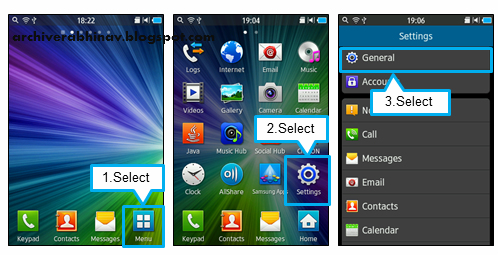
1. From the standby screen, tap Menu.
Note: you may take help of pictures , if you cant read / understand the originally set language on the phone...
So here we start -
1. From the standby screen, tap Menu.
2. Select Settings.
3. Scroll down
to General, and Select General
4. Select Language.
5. Select Display.
6. Now choose the desired language you wish to
use by tapping on it. Scroll up and down the screen to see all available
languagesNote: you may take help of pictures , if you cant read / understand the originally set language on the phone...
Thursday, February 9, 2012
Increase wave 2 s8530 battery life
Hi friends ,in this tutorial we are going to learn how to increase the battery backup of wave 2 ( s8530 ) and wave 3 .
So here is the magic code for longer battery life - Everyone should check this on his Samsung Wave . Type this code on your phone's keypad *#8740# Then, your phone will usually show AP UART Enabled. However in rare cases it may wrongly display CP UART which means that phone will drain battery 40 % faster by trying to connect to cellular networks of different frequencies again and again . To correct it type the same code again ( *#8740# ) then it will Display "AP UART Enabled" .
By this method I was able to increase battery backup of my wave s8530 from 26 to 32 hours .
Also you can get further improvement by following steps :
1.Keep the brightness at a low level. This can be done via settings menu
2.keep wifi turned off when not in use
3.switch from 3G to gsm 850/1900 mode when not using 3G for surfing or video chats .
4. Disable location services i.e. GPS/navigation services when not in use . You should only turn it on when any need gps or location services .You can reach to this option Menu > Settings > Connectivity > Location.
If you follow above steps you can easily boost battery back up of s8530 and wave 3.
So here is the magic code for longer battery life - Everyone should check this on his Samsung Wave . Type this code on your phone's keypad *#8740# Then, your phone will usually show AP UART Enabled. However in rare cases it may wrongly display CP UART which means that phone will drain battery 40 % faster by trying to connect to cellular networks of different frequencies again and again . To correct it type the same code again ( *#8740# ) then it will Display "AP UART Enabled" .
By this method I was able to increase battery backup of my wave s8530 from 26 to 32 hours .
Also you can get further improvement by following steps :
1.Keep the brightness at a low level. This can be done via settings menu
2.keep wifi turned off when not in use
3.switch from 3G to gsm 850/1900 mode when not using 3G for surfing or video chats .
4. Disable location services i.e. GPS/navigation services when not in use . You should only turn it on when any need gps or location services .You can reach to this option Menu > Settings > Connectivity > Location.
If you follow above steps you can easily boost battery back up of s8530 and wave 3.
Subscribe to:
Posts (Atom)